Reactive API in Java: An Experiment with Reactor and WebFlux

There are a lot of tools in Java to create reactive/asynchronous code, but which are the ones that allow to create a completely reactive API? In this article, I’ll explore a use case where a reactive API is required and discuss the choices I made for that purpose.
USE CASE: Aggregator of transportation
Consider a system where multiple suppliers offer various transportation options (referred to as “trips”) in response to specific requests originating, for example, from a website. These requests could encompass anything related to transportation from point A to point B.. The goal is to promptly showcase these available trips on the website, ensuring an interactive and seamless user experience. To achieve this, the system needs to be highly reactive, meaning it should promptly respond to incoming data from suppliers and update the website interface in real-time. This reactive approach enables users to view the latest transportation options without delay, enhancing their overall satisfaction and facilitating efficient decision-making.
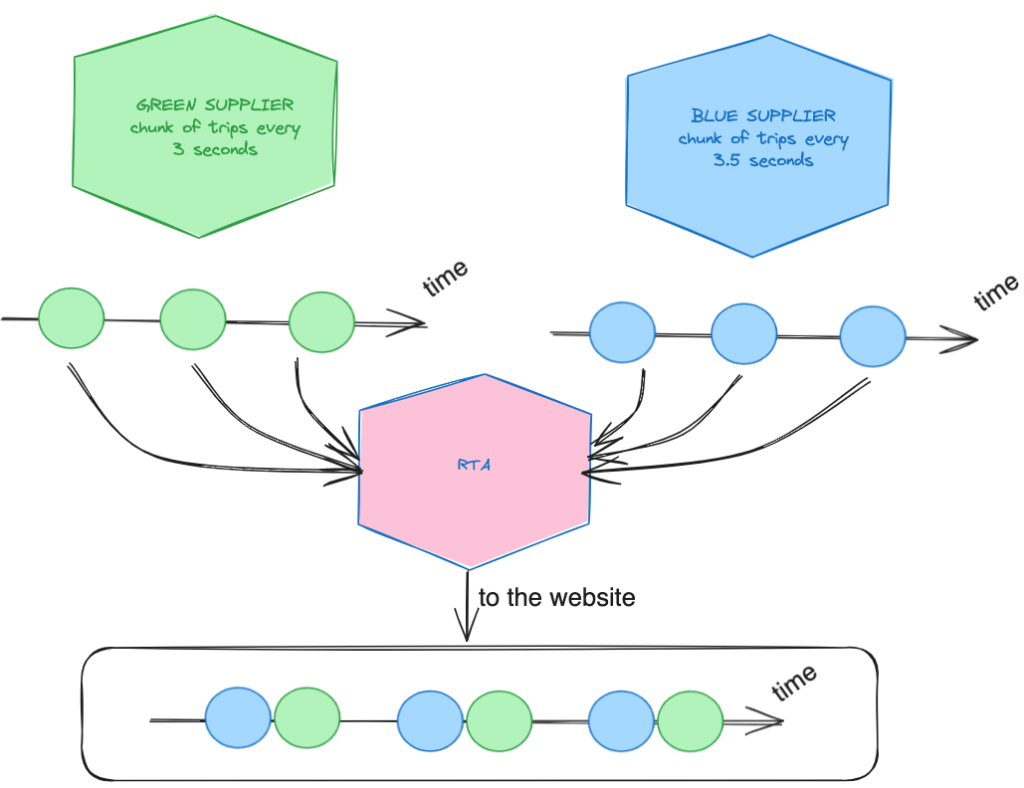 Figure 1: The Reactive Transportation Aggregator concept
Seeing the image 1 we have two suppliers called Green and Blue. We can assume that they can send data in a reactive way so in particular given a call to them they will send different chunk of data in a different time, for example: the supplier Green sends a chunk of trips every 3 seconds, while the Blue one sends one every 3.5 seconds. My goal is to create this reactive system called Reactive transportation aggregator (RTA) where each individual chunk of trip is sent to the website as soon as it arrives, without employing a classic blocking approach where we must wait for all the supplier’s responses, collect them, and then send them outside.
TOOLS IN JAVA
But what is Reactive programming? You can find a definition of it on Wikipedia and it is like:
“Reactive programming is an asynchronous programming paradigm concerned with data streams and the propagation of change. This means that it becomes possible to express static (e.g. arrays) or dynamic (e.g. event emitters) data streams with ease via the employed programming language(s).”
In Java, there are numerous ways to implement asynchronous programming in application development, each with its own strengths and weaknesses. For instance, callbacks, while commonly used, can lead to what backend engineers humorously refer to as “callback hell” due to their complexity in management. Since the advent of Java 8, CompletableFuture has gained popularity, yet it’s prone to causing blocking situations, which we aim to avoid in the RTA project.
What if we explore reactive tools tailored for Java? Among the most renowned options are rxJava and Reactor. In this article, however, I’ll concentrate on Project Reactor, a framework borne out of collaborative efforts in the open-source community. Built atop the reactive stream specification, it’s designed for developing reactive applications, adept at handling asynchronous data streams efficiently and managing demand effectively. (You can find the documentation here).
Project Reactor furnishes two principal data types: Flux, capable of emitting 0 to n elements, and Mono, which emits exactly 0 or 1 element. These will serve as the foundation for our RTA core.
Extending the reactivity to the network layer, we introduce Spring WebFlux. This fully non-blocking, annotation-based web framework, built on Project Reactor, empowers developers to construct reactive applications at the HTTP layer.
Therefore, in the RTA project, I’ll craft a fully non-blocking API using WebFlux for the network layer and leverage Reactor for the core. Enough talk—let’s dive into the code!
REACTIVE TRANSPORTATION AGGREGATOR
Basically I model the two suppliers behind an interface like this:
1
2
3
public interface SupplierRepository {
  Publisher<SupplierOutcome> performRequest(SearchRequest request);
}
I preferred to use Publisher because this way I can utilize either a Mono or a Flux object as the output.
Here is the implementation of the Blue suppliers. The one related to the green suppliers is omitted simply because it’s very similar (you will have access to the repository for further details later).
1
2
3
4
5
6
7
8
9
10
11
12
13
14
15
16
17
18
public class BlueReactiveSupplierRepository implements SupplierRepository
{

  @Override
  public Flux<SupplierOutcome> performRequest(
    SearchRequest request)
  {

    List<Trip> firstChunk = List.of(...);
    List<Trip> secondChunk = List.of(...);
    List<Trip> thirdChunk = List.of(...);

    return Flux.just(new SupplierOutcome(firstChunk),
        new SupplierOutcome(secondChunk),
        new SupplierOutcome(thirdChunk))
      .delayElements(Duration.ofMillis(3500));
  }
}
As you can see, they receive a SearchRequest object, create some fake chunks of trips, transform them into a SupplierOutcome object (which contains a list of trips), and put them into a Flux. Each chunk is delayed, with the green one delayed by 3 seconds and the blue one by 3.5 seconds.
After that, I created a service called StandardSuppliersOutcomeService that needs to collect the supplier repositories and call them all. Below is the code:
1
2
3
4
5
6
7
8
9
10
11
12
13
14
15
16
17
18
19
20
21
public class StandardSuppliersOutcomeService implements SuppliersOutcomeService {

  private final SuppliersConfigurationRepository repository;

  public StandardSuppliersOutcomeService(
    SuppliersConfigurationRepository repository)
  {
    this.repository = repository;
  }

  @Override
  public Flux<SupplierOutcome> from(SearchRequest request) {

    return repository //1
      .getSuppliersFor(request) //2
      .parallel() //3
      .runOn(Schedulers.parallel()) //4
      .flatMap(supplier ->  supplier.performRequest(request)) //5
      .sequential(); //6
  }
}
The SuppliersConfigurationRepository provides all the available suppliers to call (lines with comments 1 and 2). Once we have the suppliers, I want to call them in parallel (lines with comments 3 and 4), simply using a flat map for the call (line 5), and then putting them into a sequential Flux so that the SupplierOutcomes will be emitted as they arrive.
The service is invoked by a simple use case that calls the service and transforms the SupplierOutcome objects into Solutions, which are the objects I want to expose outside the application (essentially DTOs). Here’s the use case:
1
2
3
4
5
6
7
8
9
10
11
12
13
14
15
16
17
18
19
20
21
22
23
24
25
26
27
28
29
30
31
32
33
public class StandardSearchUseCase implements SearchUseCase {

  private final RequestAdapter requestAdapter;
  private final SolutionsAdapter solutionsAdapter;
  private final SuppliersOutcomeService suppliersOutcomeService;

  public StandardSearchUseCase(
    SuppliersOutcomeService suppliersOutcomeService,
    SolutionsAdapter solutionsAdapter,
    RequestAdapter requestAdapter)
  {
    this.requestAdapter = requestAdapter;
    this.solutionsAdapter = solutionsAdapter;
    this.suppliersOutcomeService = suppliersOutcomeService;
  }

  @Override
  public Flux<Solutions> searchOn(SearchRequestDto requestDto)
  {

    SearchRequest request = requestAdapter.from(requestDto);

    Flux<SupplierOutcome> supplierOutcomeFlux =
      suppliersOutcomeService.from(request);

    return supplierOutcomeFlux
      .map(supplierOutcome ->
        new Solutions(supplierOutcome
          .trips()
          .stream().map(trip ->...).collect(Collectors.toList())));

  }
}
And finally, here’s the last layer, which is the controller:
1
2
3
4
5
6
7
8
9
10
11
12
13
14
15
16
17
18
19
20
21
22
23
24
25
26
@RestController
@RequestMapping(value = "/aggregator")
public class TransportationAggregatorController {

  private final SearchUseCase searchUseCase;

  public TransportationAggregatorController(
    SearchUseCase searchUseCase)
  {
    this.searchUseCase = searchUseCase;
  }


  @GetMapping("/search")
  public Flux<Solutions> search(@RequestParam String departure,
                                @RequestParam String arrival,
                                @RequestParam String departureDate) {

    SearchRequestDto request = new SearchRequestDto(
      departure,
      arrival,
      departureDate);

    return searchUseCase.searchOn(request);
  }
}
As you can see the controller is very easy and the method GET returns directly a Flux of solutions. If you call this endpoint on google chrome for example here the result:
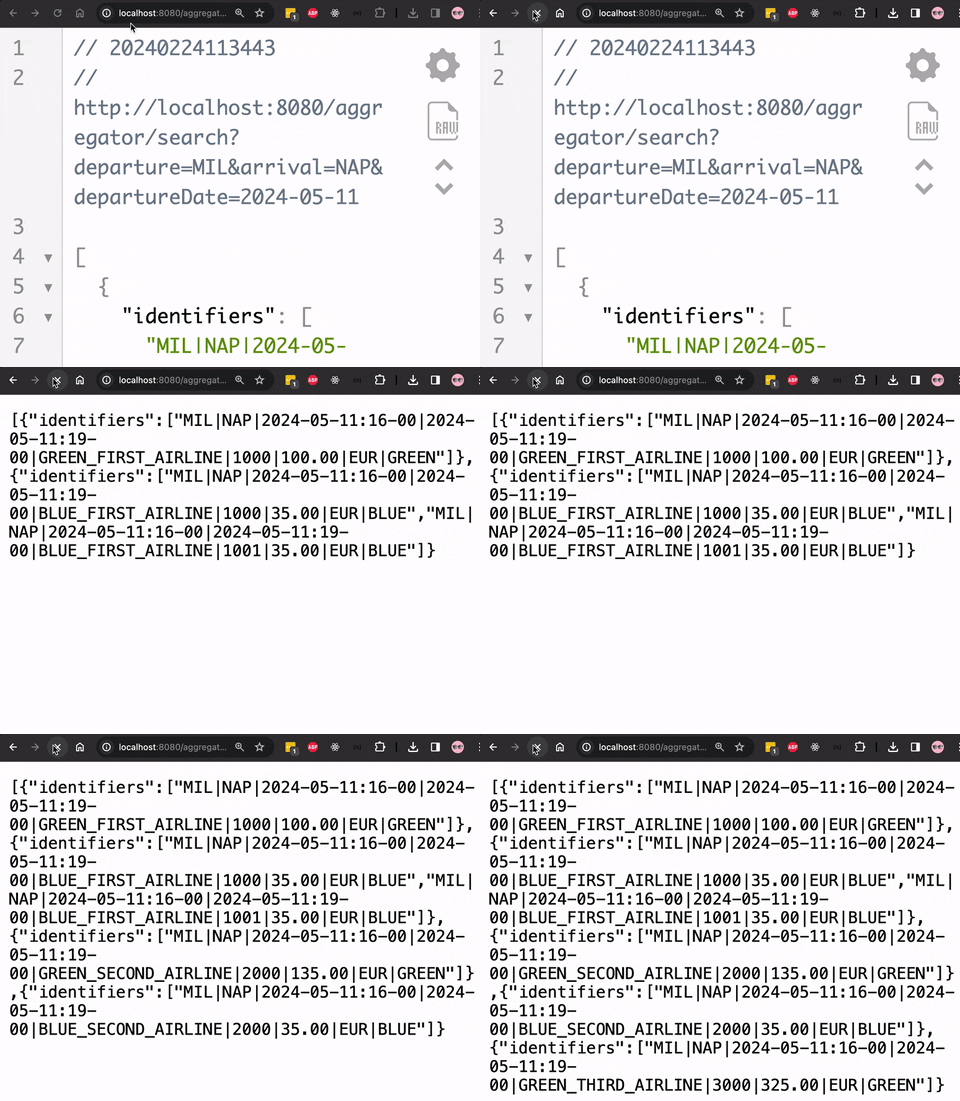 Figure 2: The API responding progressively in the browser
As the results arrive they are printed on the screen. For a better experience I suggest to download the repository here and try it on your local machine, in this way, you can also view the code and let me know if you would approach anything differently!
With this approach, we can finally build a highly responsive website where users can view transportation solutions as they arrive from suppliers. This allows users to immediately engage with the solutions, thus avoiding any potential time wastage that could prompt customers to leave the site. For further insight into user attention, I can provide a useful article that covers the underlying theory.
CONS
I prefer to delve into the cons rather than the pros because the pros are very well articulated in the documentation of the Reactor project and in general in the Reactive Streams specification. The cons that I have found are:
- Learning curve: It is not easy to enter into this specification, and it is not straightforward to debug code that uses this paradigm.
- Alignment: Adopting reactive programming within a team necessitates full alignment among all members and a comprehensive understanding of its principles. Hence, its adoption should be a collective decision made by the team.